What's new in Handle — October 2026
Artifacts bring purpose-built interfaces to Handle Chat, alongside better file handling, stronger account security and simpler pricing.
On this page
Introducing artifacts — purpose-built interfaces your Handler creates, from live dashboards to what-if models to review screens — plus the library that organizes them, steadier file handling, session controls you can see, and simpler pricing.
Meet artifacts
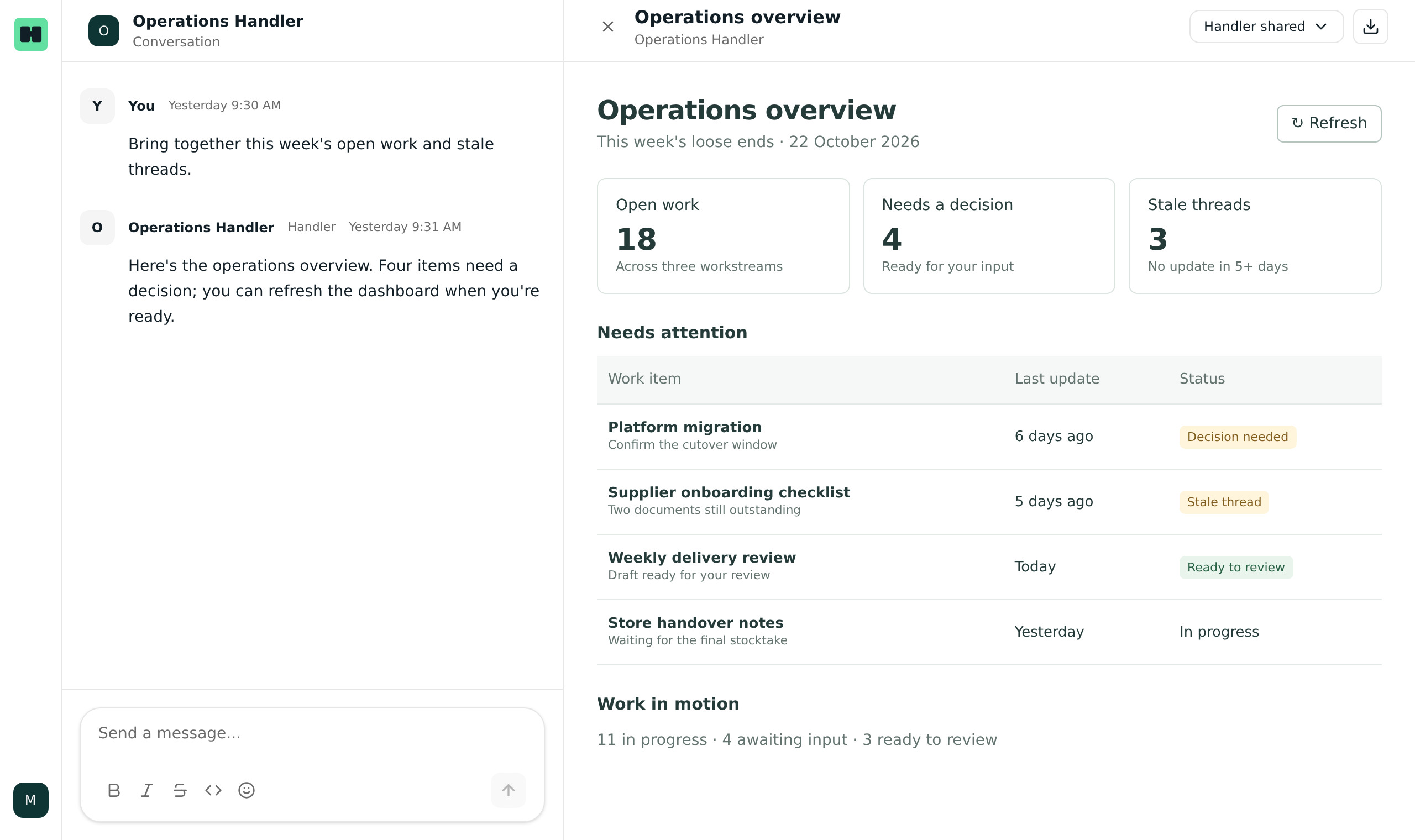
Much of the work you hand a Handler doesn’t end with a reply — it ends with something you use. A dashboard you check each morning. A budget you stress-test. A queue of drafts you look over before anything goes out. Artifacts are how that work shows up in Handle: small interfaces your Handler builds and renders right in Handle Chat.
If you’ve seen “artifacts” in other AI products, think of these as the next step: they’re connected to your systems and can act on them. An artifact works with live data from the tools you’ve connected — open it and it reflects the current state of things. And it never replaces the conversation: when an artifact isn’t quite right, tell your Handler what’s off and it changes the artifact for you. No rebuilding, and no separate tools to buy, learn or maintain.
Some work is simply faster by clicking than by asking — scanning a dashboard instead of requesting a report, testing a scenario instead of describing one, reviewing drafts in one place instead of one by one. That’s what artifacts are for, and your Handler builds each one around exactly what you need.
Artifacts in practice:
At Handle:
- An operations dashboard that gathers the week’s loose ends — stale work, open threads — with a refresh button.
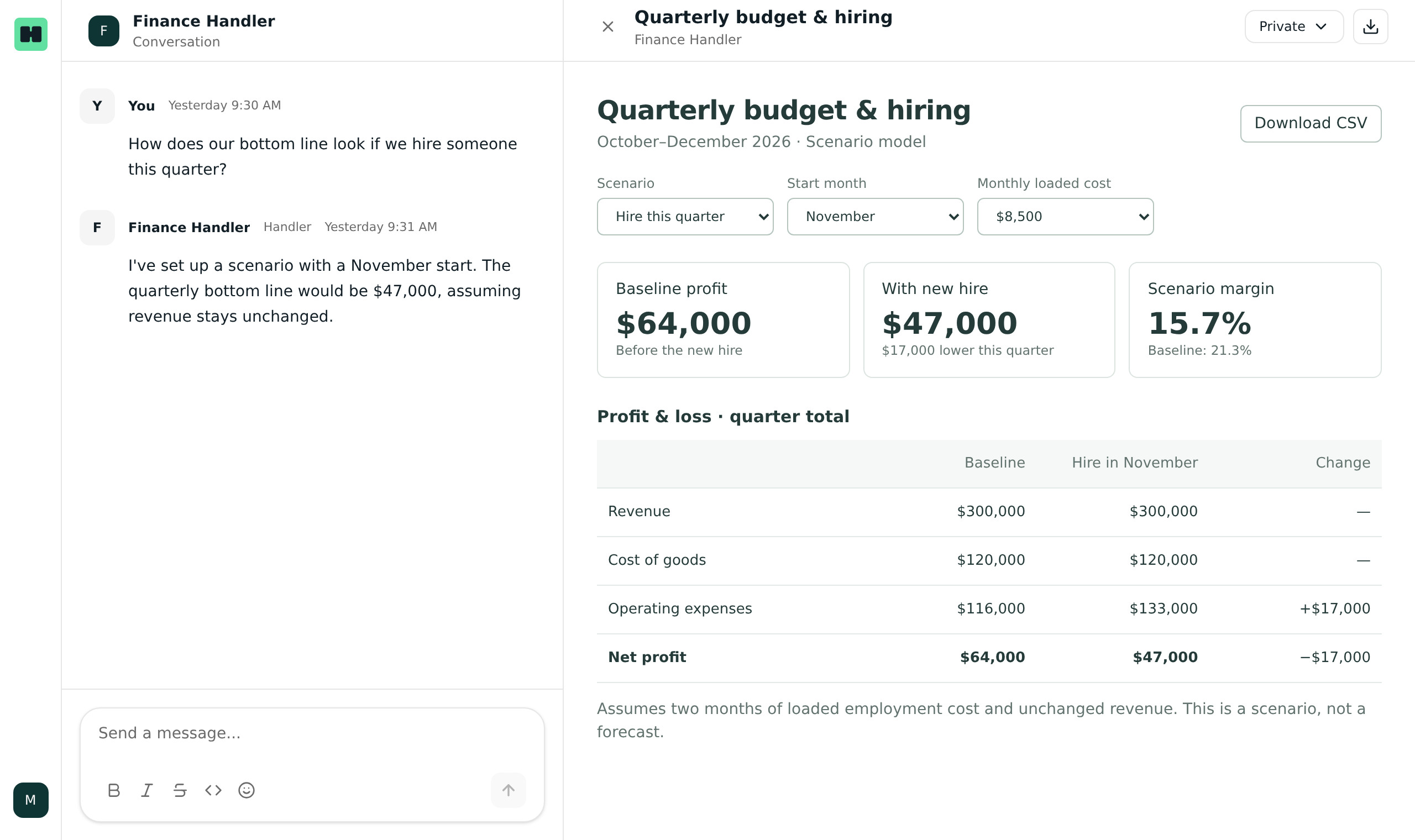
- Budget and P&L models where we test scenarios (“How does our bottom line look if we hire someone this quarter?”) by talking to our Handler right beside the numbers.
- A review screen for outbound email — every draft in one place, with an approve-and-send button.
And at one of our customers (anonymised):
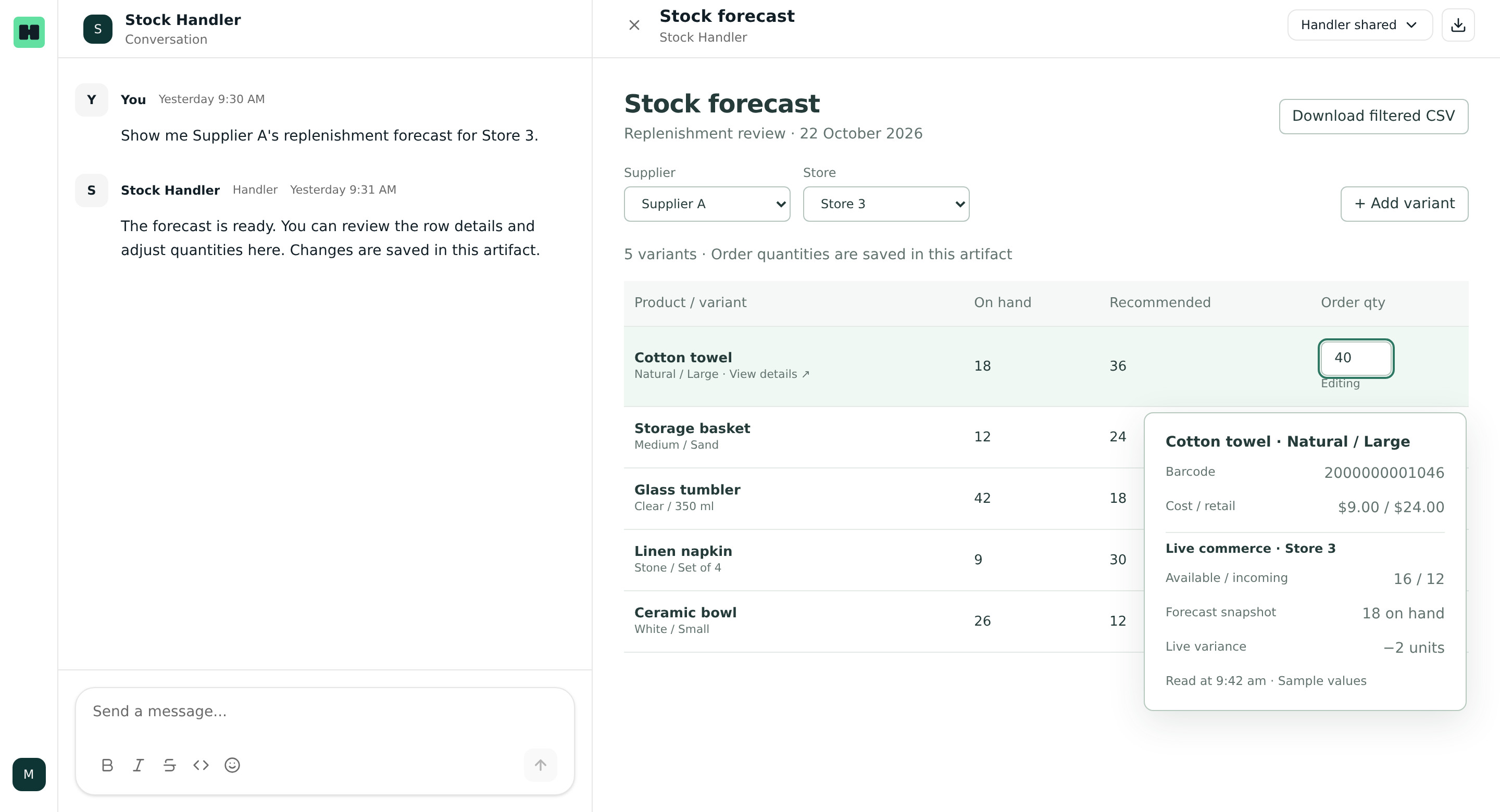
Their Handler runs stock forecasting for a growing retail group — a lot of number-crunching that used to arrive as a CSV: open it in a spreadsheet, filter it, cross-check it against the live store, and any quantities you adjusted stayed on your side while the original report went stale. Now the forecast arrives as an artifact: filter it by supplier or store, click a row to see the numbers behind it — including live data from their commerce system — adjust order quantities in place, add a variant the forecast missed, and download exactly the filtered set — and the edits they make are saved. When the artifact should look or work differently, they tell their Handler and it changes.
Safe by design
Artifacts run in a strict sandbox. They can only reach the specific tools you’ve explicitly approved for them, and your credentials and integrations stay on Handle’s servers — an artifact never holds them.
One organized home: the artifact library
As your Handlers create more, every artifact gets a home in the artifact library — one organized place to browse and open them, so finished work stops being buried in conversations. Artifacts stay private to you by default; sharing is opt-in and manager-controlled, so the right people can find and build on finished work. Handovers get simpler too: instead of pointing a teammate at a conversation, you hand over the artifact.
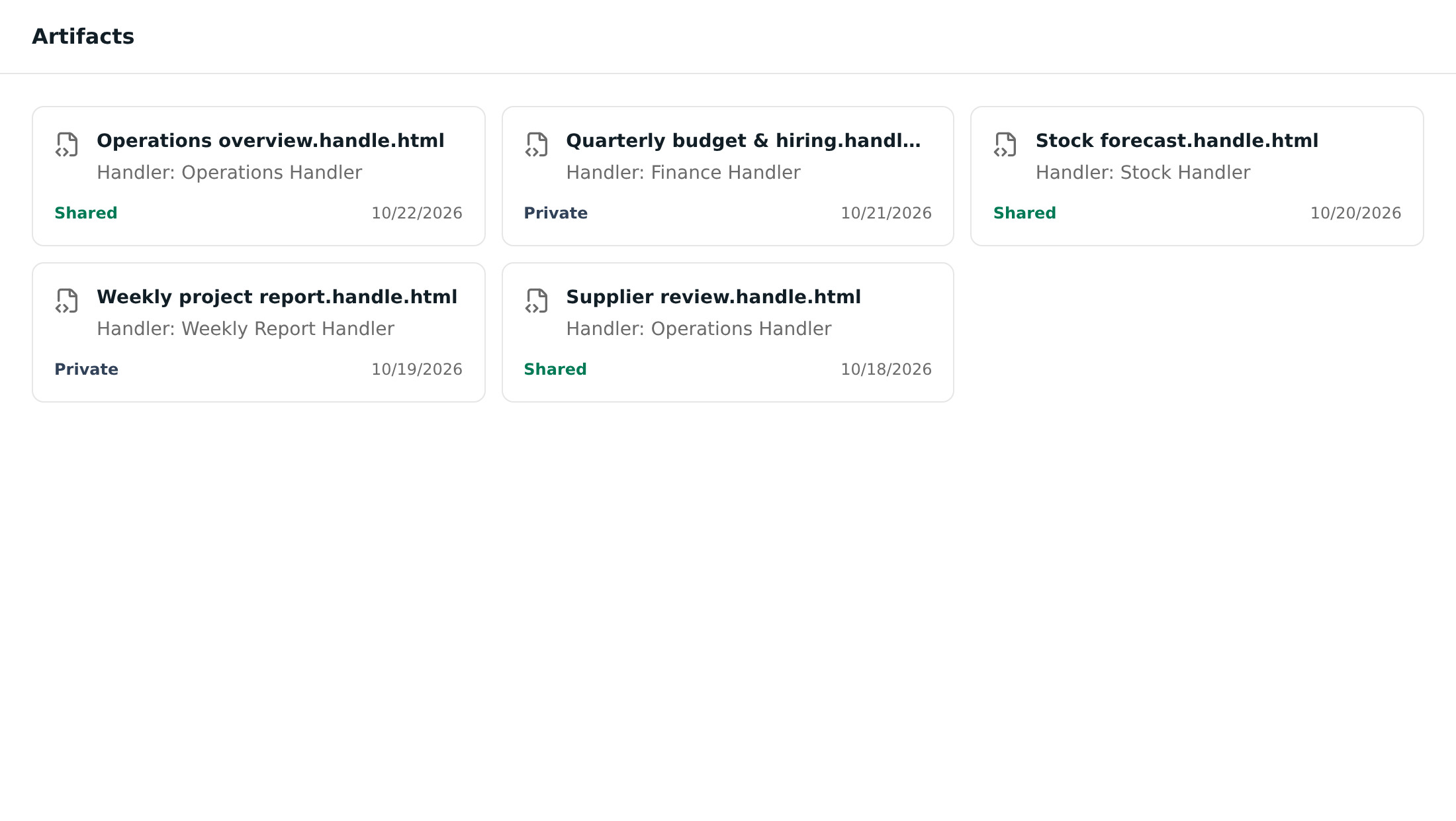
Clean inline previews let you look a result over before it goes anywhere, and artifacts follow your theme in both light and dark mode.
Sketch it, check it, refine it
Artifacts aren’t only data and dashboards. Your Handler can sketch visual concepts, show them to you for feedback, and refine them over a few rounds before building the finished thing — a loop that’s especially useful for design-heavy work. Image generation is manager-controlled.
Files that just work
Handlers keep getting better at the unglamorous but critical job of moving files around:
- Large file appends are streamed to disk instead of being loaded into memory — real-world tested with a 430MB spreadsheet.
- Images preview inline, with a clear uploading state so you always know what’s happening.
- Previews stay current: when a Handler edits a file, its preview refreshes.
- Legacy Excel support: older
.xlsspreadsheets can now be examined and their contents extracted, alongside modern formats.
Stronger account security
You can now see every active session on your account — device, sign-in time and IP — and revoke any of them, or revoke all other sessions at once. Revocation is enforced on the server: logged-out devices stop receiving messages and push notifications immediately, not just the next time they open the app.
Simpler, more flexible pricing
These plans and prices reflect October 2026. See current plans and prices for the latest details.
We’ve restructured self-serve pricing around three Standard plans, measured against one Full-time Handler’s monthly capacity — including the new Part time and Full time 4x plans:
| Plan | Included capacity | Best for | Price (AUD excl. GST) |
|---|---|---|---|
| Part time | 0.1× | Lightweight, ongoing work | $150 / month |
| Full time | 1× | Keeping operations moving | $1,100 / month |
| Full time 4x | 4× | Demanding, high-volume work | $4,400 / month |
- Every plan includes the same features — unlimited human collaborators, unlimited integrations, unlimited artifacts, webhooks and routines, Handle Chat and Slack. The only difference is capacity.
- Annual billing saves 10% on any plan.
- Extra capacity is a shared team pool. Buy it once and it’s there for your whole team of Handlers in the workspace — not metered per individual — so a single purchase keeps everyone unblocked. There’s no maximum, larger purchases come with volume discounts, and purchased capacity stays available for 12 months.
- Full time 4x makes larger Handlers more economical, bundling four Full-time Handlers’ monthly capacity into a single plan.
The pricing page also includes a live calculator, so you can price exactly the extra capacity your team needs before you buy.
These updates are available now. If you’d like help sizing a plan for your team, get in touch.