Manage Integrations
Manage your Handler's connections to Shopify, Google Workspace, Zendesk, Notion, and other platforms.
On this page
Integrations are how your Handlers connect to the tools and platforms you already use — Shopify, Google Workspace, Gorgias, Notion and more. By setting up integrations, you give your Handlers the ability to perform real work using your own tools and data.
Integration setup is often prompted directly from Slack, so you don’t need to visit this page before you start using Handle. But when you do want to manage your connections, this is the place.
Getting There
Click on your name at the bottom of the left-hand navigation panel. This takes you to your profile page, where your integrations are listed alongside your profile settings.
Available vs. Connected Integrations
The integrations page is split into two sections:
- Connected Integrations — Integrations you’ve already set up and are ready to use
- Available Integrations — Integrations you haven’t connected yet, waiting for you to get started
Each connected integration shows its logo, name, and how many connections or Handlers are using it.
Connecting a New Integration
Click on an available integration to begin the setup flow. Depending on the integration, you’ll encounter one of a few connection methods:
- OAuth — You’ll be redirected to the platform to authorise access (e.g. signing into Slack or Zendesk). One click and you’re connected.
- API Key / Credentials — You’ll enter your credentials directly in Handle. Sensitive fields (like API keys and passwords) are clearly marked.
- App Installation — Some integrations ask you to install an app on the external platform first (e.g. via a marketplace).
Some integrations offer more than one connection method — you’ll be presented with the options and can choose whichever suits you best.
Managing Existing Connections
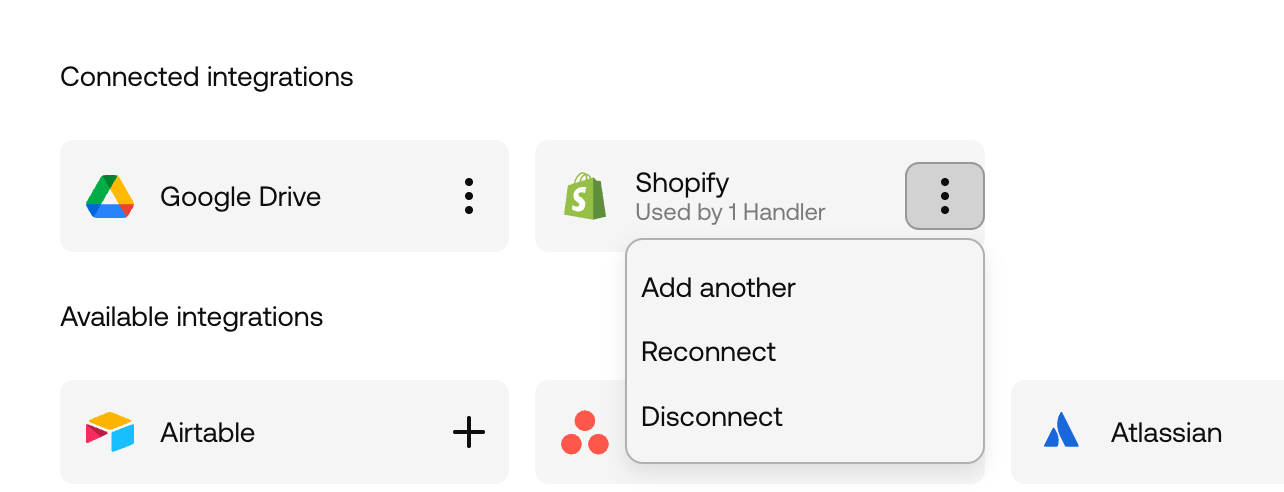
For each connected integration, click the dropdown menu to access your options:
- Edit — Update credentials, API keys, or other configuration
- Test — Verify the connection is working
- Disconnect — Remove the integration entirely
Default vs. Handler-Specific Connections
When you connect an integration at the workspace level, it becomes the default for all Handlers. Individual Handlers can override this by setting up their own connections via their Handler Connected Integrations page.
This means you can have a single Shopify connection that all Handlers use, but give one specific Handler access to a different store.